Do you have a Vision or two you want to share with the world?
Something to help people or businesses have better experiences?
Or simply your own stories?

The world needs that special gift that only you have!
I am something like a Zen Master at getting information out to audiences worldwide across a wealth of platforms.
Here is what I do to spread the word of my own visions for the world. I can do the same for your visions.
Blog Posts
Most content launches start with a blog post like this one.
Often, I will write directly in WordPress or draft in Google Docs.
I’ve trained an AI system in AWAI Copyediting, Copywriting, and across many subject areas.
I use folders in Grok. Most AI systems will work great. I often ask for copyediting feedback and a revised draft. I use this approach for client projects as well as my own.
Splash Images
I use a variety of sources and Adobe Photoshop to create an image that conveys the message.
These images are essential for search listings, YouTube, and social media posts.
Google Search Console
I use Yaost in WordPress to optimize for search engines (SEO) and AI learning models.
Then I register with Google Search Console.
Registering with Google Search Console, combined with the steps outlined below, can help the page appear in search results within a few hours of launch.
Social Media
I use GoHighLevel to send messages across social media platforms, including LinkedIn profiles and pages, Facebook profiles and pages, Instagram, and more.
Sometimes I copy and paste the blog post, edit it, and send it. Or I will create an intro and a link.
Following Dan Kennedy’s guidance, there will always be a Call To Action with a link.
Video Streaming
I follow up the blog post with a related live stream using StreamYard Studio.
My streaming destinations are LinkedIn, YouTube, and many Facebook profiles and pages. More destinations are available through StreamYard.
The marketing tool in GoHighLevel can send the video to more destinations.
LinkedIn is my favourite connection platform.
Audio Podcasts
I can use the audio and transcript from StreamYard to syndicate an audio podcast through Buzzsprout.
Often, I paste and edit the blog post for use as the show notes. Adding the transcript can improve search results.
The word ‘podcast’ has come to describe a general ‘broadcast’, either video or audio. The usage is unhelpful as the platforms are quite different, with different distribution mechanisms and audiences.

The audio podcasts get to a different audience than the video broadcasts and social media.
And people can subscribe to your podcasts on most of these platforms.
Another bonus is that your episodes could also appear in search results.
Substack and LinkedIn Articles
Both Substack and LinkedIn articles show up online and in email to subscribers.
The blog post can be pasted in and edited, providing a quick way to reach another audience.
I connected my Substack account to my Buzzsprout podcast acount and Substack generated Substack posts from my podcasts.
Bonus!
Email is still the best way to reach people who want to learn about your golden content and offers.
If not, they can simply unsubscribe.
Most content that would go into a blog post can also be sent via email for convenience to your audience.
I use Kartra for email, membership courses, video, surveys, landing pages, and more. I am one of the top experts worldwide on the platform and have helped many clients on the platform.
A three-month trial of Kartra is available now.
Book Publishing
There are many reasons for publishing a book, including leaving your insights and stories for posterity and opening doors for you and your business.
Putting a book on Amazon with Amazon KDP gives you a presence on the world’s largest book market.
Listing on IngramSpark enables book sales through bookstores and makes the book available for order in libraries and other outlets.
The content from blog posts can also be used in your books.
Shared Visions Unlimited and collaborators can help publish your books in multiple formats, including:
- Print Book
- eBook
- PDF (great for lead magnets and printable resources)
- Audiobooks
- Digital Experience Editions (Kartra Memberships)
- Flipbook.
- Book Website.
Membership Courses
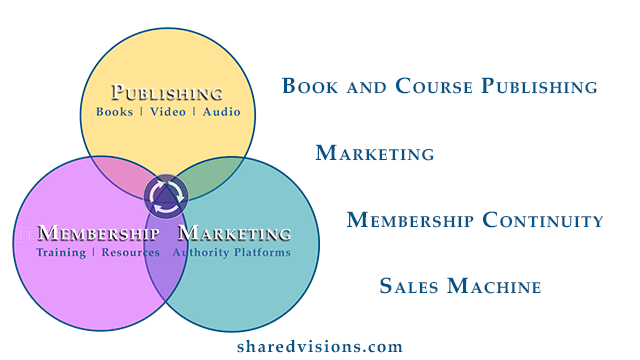
If you come to me with a book idea, I will also suggest developing a course.
The same goes for a course—could we publish a book on the topic?
My membership platform of choice is Kartra because it integrates text, video, audio, surveys, quizzes, payments, and more into a sophisticated multimedia membership course that performs better on smartphones than many dedicated apps.
GoHighLevel, Teachable, Kajabi, and other platforms are also worthy.
Media Articles
Sometimes your content would also find an audience through magazines, newsletters, radio, and television. Start with your local media outlets.
Publicity
The launch of a book, membership course, product, or service can attract significant attention through press releases.
Speaking
Speaking on podcasts, in broadcasts, at events, in networking meetings, and in front of interested groups can help bring your vision to the world.
Come be my guest on the Shared Visions Unlimited Show!
Across Multiple Dimensions

Not only is the universe stranger than we think, it is stranger than we can think.
Many people believe that humans are not limited by time and space and can communicate through practices such as prayer, meditation, and connections beyond conventional notions of the physical world.
Next Steps
Please consider using more of these platforms to share your vision with the world.
I can help you plan and implement many of them.
— Greg Dixon
Your Chief Enabler
Shared Visions Unlimited